
Cybersecurity is a decades-old field focused on protecting our increasingly digital world. It secures systems, networks, applications, and data from unauthorized access, misuse, and disruption.
AI, on the other hand, is comparatively young. Even the current deep-learning renaissance dates back only about 15 years: to AlexNet in 2012, when Hinton, Ilya Sutskever, and Alex Krizhevsky showed how neural networks could be accelerated with CUDA on NVIDIA GPUs.
Over the past year, especially with the rise of agentic AI, the way we build computer systems has changed dramatically. These capabilities are reshaping everything from how we build and accelerate kernels (from operating systems to hardware acceleration) to how we develop software and deploy it to the cloud.
AI is also accelerating how quickly people can investigate our digital systems. This creates a natural convergence: cybersecurity must now account not only for increasingly complex systems, but also for AI that can analyze, attack, and defend them at unprecedented speed.
My background is in deep learning. I completed my PhD between 2012 and 2016. I came to cybersecurity through building language models and agent systems, including WhiteRabbitNeo and Drost. AI has drastically accelerated my own learning, and I’ve wanted to write a series of posts to help others develop a clear understanding of AI’s role in cybersecurity, along with the fundamentals needed to get started.
In this first post, I’ll lay the groundwork. We’ll begin with the foundations, narrow the discussion to web applications, and examine the different kinds of impact an attacker might achieve. By the end, we’ll arrive at the starting point for the next post: mapping the application’s attack surface.
What offensive cybersecurity is

Simply put, offensive cybersecurity is about breaking digital systems. It intentionally takes the perspective of an adversary, and pokes around to find the gaps and vulnerabilities to make a system do things beyond its intended behavior. When used in authorized settings (i.e. “Whitehat”), the purpose of offensive cybersecurity is to establish weaknesses and their impact so the people responsible for the system can make informed decisions about fixing them.
For example, for an enterprise, the questions are straightforward. Can a normal user access records belonging to someone else? Can an account perform an administrative action it should not be allowed to perform? Could a flaw in the application expose the systems supporting it?
When you spend time in offensive cybersecurity, you will also come across two terms that are used frequently: penetration testing and red teaming. Although they overlap, they generally focus on different parts of an attack.
A penetration test (pentest) typically evaluates whether an organization’s external defenses can be defeated. It focuses on obtaining an initial foothold—for example, by exploiting a web application or compromising an internet-facing service.
A red-teaming exercise, by contrast, attempts to emulate a capable adversary across the organization’s broader security posture. An engagement may last weeks or months and can involve activities such as persistence, lateral movement, privilege escalation, and data access or exfiltration. In other words, red teaming is often about what happens after the initial foothold.
Let’s take a concrete example to make the distinction better. Consider Nestlé, the world’s largest food and beverage company. It may operate numerous web applications serving customers, internal teams, marketing, sales, and e-commerce. Suppose an attacker wants to reach a crown jewel, such as product-development recipes. The initial foothold might come from compromising an internal CRM exposed through a web address. Exploiting that web application would generally fall within the scope of a penetration test. What happens afterward—escaping the compromised server, moving laterally through internal systems, reaching the recipe database, and exfiltrating data—would be more representative of a red-team exercise.
The distinction is useful, but the activities are complementary. Both matter because the central question is the same: How far could an attacker actually go?
How AI has accelerated offensive cybersecurity

Offensive cybersecurity work involves a great deal of interpretation. In black-box settings—where you do not have access to the underlying code—you send requests to an endpoint, observe its behavior, and infer how that endpoint works. AI offers tremendous advantages here, acting as a force multiplier regardless of the user’s skill level.
For someone learning the field, the immediate benefit is access to clear, interactive explanations. You can ask about an unfamiliar protocol, a piece of application code, or a security concept, then work through the answer step by step. For experienced practitioners, AI reduces the time required to understand and organize large amounts of technical material.
But access to knowledge and faster synthesis are only part of the story. As discussed above, the past year has seen an explosion in agentic software. AI agents do not merely distill knowledge; they also take action. A capable, cooperative LLM, paired with an agent harness such as OpenCode or Pi-agent, can be used effectively across offensive cybersecurity operations: discovering web application endpoints, researching known vulnerabilities (usually called CVEs) in discovered software, and creating exploits. Agentic AI systems have accelerated both the effectiveness of engagements and the speed at which they can be conducted. This is also where fully autonomous offensive cybersecurity AI agents, such as Drost, are making a significant impact.
However, you should still learn the fundamentals. AI is an amplifier: the more skilled you are, the more effectively you can guide these advanced systems.
Offensive cybersecurity in web applications
We’re going to now intentionally narrow our focus area, so that we can get the best out of this series. We’re going to select web applications — it’s a useful place to start because their behavior is familiar. We sign in, search, upload files, send messages, and make purchases.
Behind each of those actions is a set of connected components. At a simplified level, a browser sends requests to an application, often through an API: an interface through which software requests data or actions. The application processes those requests and may interact with databases, storage, background workers, or external services before returning a response.
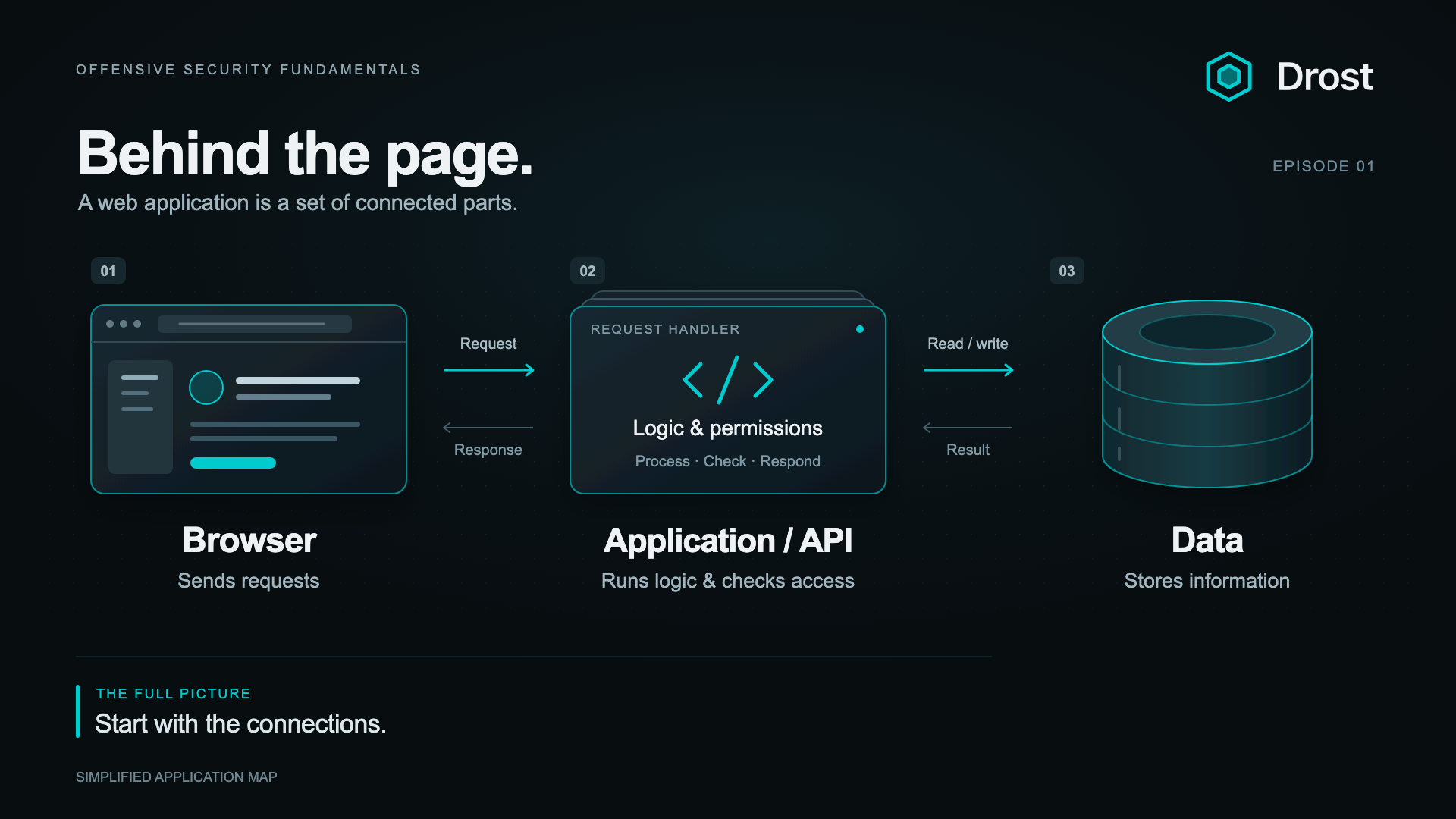
A simplified application map: browser → application/API → data.
Consider updating a profile. The browser submits the changes. The application needs to establish who is making the request (i.e. “who is authenticated?”), which profile they are allowed to change (“what authorization does this user have?”), which fields they may modify (“the permissions”), and whether the supplied values are acceptable. Only then should the appropriate data be updated.
Authentication establishes identity. Authorization determines what that identity is allowed to do. Input handling determines how the application interprets the data it receives.
A trust boundary marks a change in how much authority or trust something has. Data arriving from a browser crosses into a server-controlled environment. A request made by one customer must remain confined to the access that customer is entitled to. An application process may have permissions to use a database without having permission to administer the entire server.
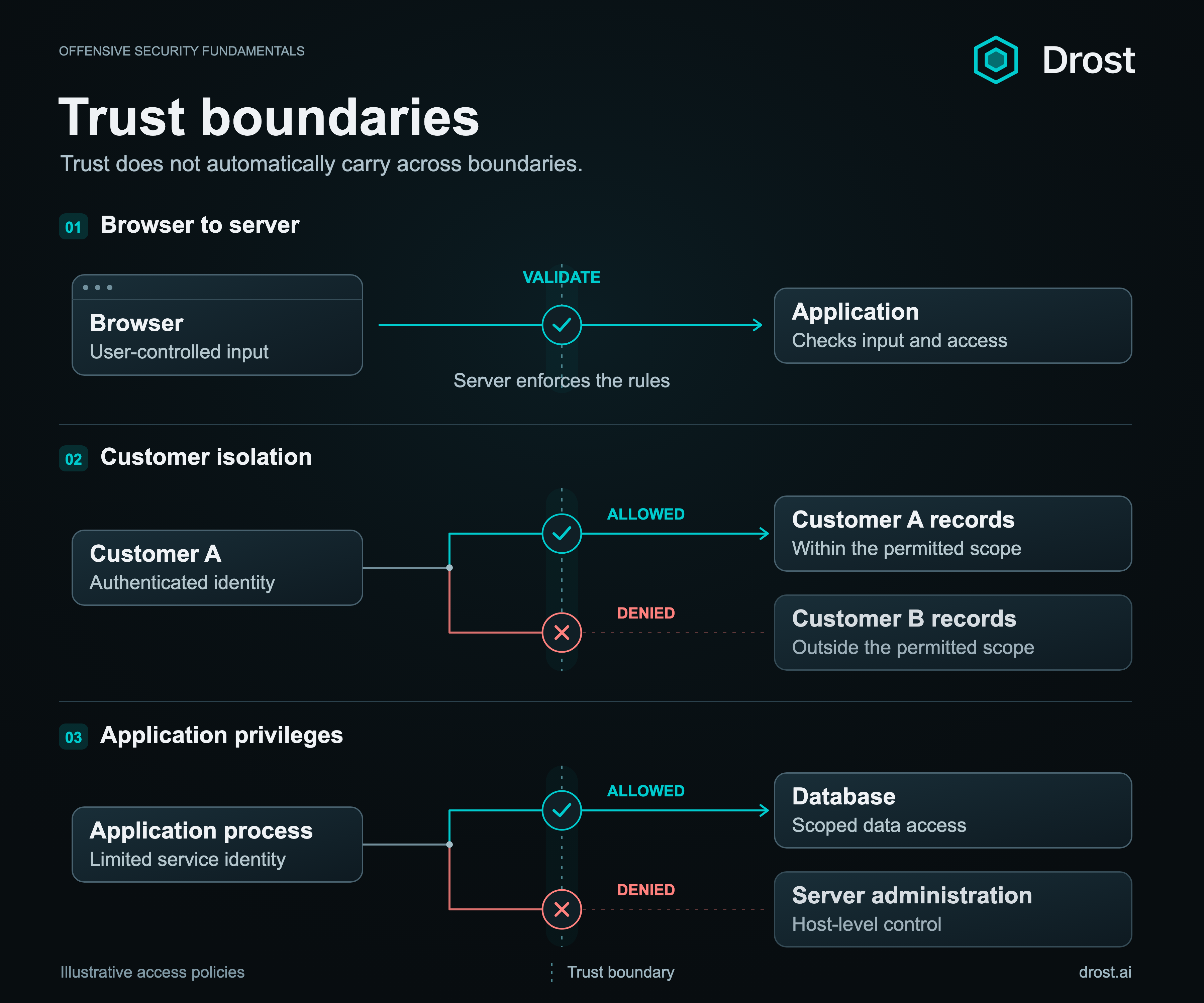
In a technical sense, an offensive engagement examines whether those boundaries hold. The visible page is one part of the system; the security properties extend through the services and identities behind it.
Categories of attacks in web applications
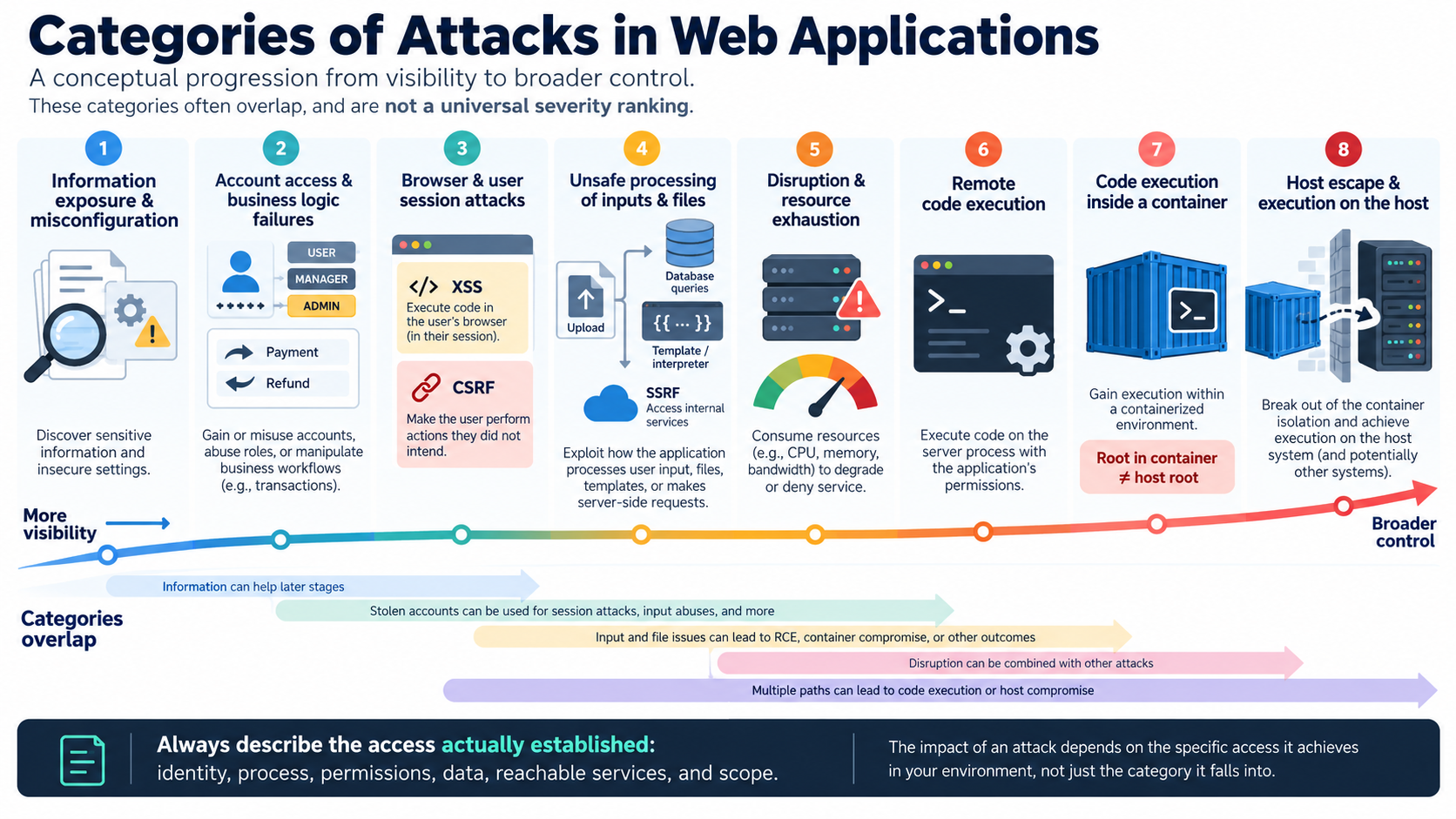
Here are the major families, grouped by the kind of failure involved. The examples use common names; categories overlap, and severity depends on the access and impact.
| Family | Common names and examples | Possible impact |
|---|---|---|
| Configuration and information exposure | Information disclosure, exposed debug/admin interfaces, default credentials, subdomain takeover, forgotten APIs. | Leaked data or access to unintentionally exposed services. |
| Cryptography and secrets | Weak TLS/encryption, weak password hashing, padding oracles, exposed keys and credentials. | Loss of confidentiality or trusted identity. |
| Authentication and identity | Authentication bypass, credential stuffing, brute force, registration/password-reset/MFA flaws. | Account takeover or impersonation. |
| Sessions and SSO | Session fixation/hijacking, token replay, JWT, OAuth/OIDC and SAML flaws. | Stolen sessions or unauthorized account access. |
| Authorization and API access | IDOR/BOLA (object access), BFLA (function access), mass assignment/property-level authorization, privilege escalation. | Access to other users' data, protected fields or administrative functions. |
| Browser content injection | XSS (stored, reflected, DOM-based), HTML injection, client-side template injection. | Script execution, page manipulation or data exposure. |
| Browser trust and cross-origin flaws | CSRF, clickjacking, CORS and postMessage flaws, WebSocket hijacking, open redirects. | Unwanted user actions or exposure across origin boundaries. |
| Backend query and code injection | SQLi, NoSQL injection, OS command injection, SSTI (server-side template injection), expression, LDAP and XPath injection. | Unauthorized queries, altered processing or code execution. |
| Unsafe parsing and object handling | XXE (XML external entities), insecure deserialization, prototype pollution. | Data disclosure, changed program behavior or code execution. |
| Files and paths | Path traversal, LFI/RFI (local/remote file inclusion), unsafe file upload, archive extraction flaws (Zip Slip). | Unauthorized file access, overwrites or code execution. |
| HTTP proxies and caches | Request smuggling/desync, response splitting, HTTP parameter pollution, Host-header attacks, cache poisoning/deception. | Misrouted requests, poisoned responses or private-data exposure. |
| Server requests and integrations | SSRF, webhook abuse, unsafe consumption of third-party APIs. | Unintended server-side access or misuse of trusted integrations. |
| Business logic and concurrency | Workflow/payment abuse, race conditions, TOCTOU (time-of-check/time-of-use), repeated transaction abuse. | Fraud, inconsistent state or bypassed business rules. |
| Availability and resource abuse | DoS/DDoS, ReDoS (regular-expression DoS), expensive-query abuse, missing resource/rate limits. | Downtime, degraded service or excessive costs. |
| Dependencies and software integrity | Vulnerable components, malicious dependencies, dependency confusion, compromised builds/updates or third-party scripts. | Compromised application code or trusted delivery paths. |
| Native-code memory safety | Buffer overflows, out-of-bounds access, use-after-free and type confusion in native components. | Process crashes, memory disclosure or code execution. |
| AI-enabled features (where present) | Prompt injection, data/RAG poisoning, unsafe model-output handling, excessive agency. | Unintended actions, data disclosure or manipulated outputs. |
These families apply across REST, GraphQL and WebSocket interfaces. Insecure design, fail-open error handling and inadequate logging can enable or conceal several of them. OWASP's broader risk categories cover these cross-cutting weaknesses.
Execution outcomes and scope
Remote code execution (RCE) is an outcome that several families can produce. Its scope needs to be established separately:
| Execution outcome | What it establishes |
|---|---|
| Application or container RCE | Code executes with the affected process's permissions. A container may limit its reach. |
| Container escape | The container's isolation boundary has been crossed. This requires additional evidence beyond container RCE. |
| Host RCE | Code executes in the host OS. Full administrative control depends on the privileges obtained. |
These are distinct outcomes, not automatic steps. Root inside a container does not by itself mean root on the host.
The first step is attack surface mapping
All these categories depend on the application in front of you: what it exposes, what it processes, and which identities and permissions connect its parts.
That is why the practical work starts with mapping the attack surface. The initial questions are about understanding the system. What endpoints exist? Which interactions are public and which require an account (authenticated vs un-authenticated)? What endpoints take in data that we can controlled (attacked controlled input)? What kinds of data enter the application? Which services process or store that data? Where do permissions change?
AI accelerates this step significantly. In the next post, we'll use a concrete example to identify and examine a web application’s attack surface map and identify possible attack vectors that deserve closer review. We’ll begin our hands-on, practical part of the series with videos. Here’s a sneak peak of endpoint enumeration: Watch the preview
Mapping the attack surface
The practical series continues with video walkthroughs.
View upcoming tutorials